A pet portrait preview is your chance to check that the artwork feels like the animal you know before you approve it for printing. Compare it with your original photo, separate a deliberate style choice from a changed feature, and describe any adjustment with a clear reference. You do not need an art vocabulary. Knowing your pet is the useful part.
How should you review a pet portrait preview?
Give the picture three passes: the whole piece, the familiar details, and the final crop. Open the photo you supplied alongside the preview so you can move between them without searching through your camera roll.
For the first pass, leave the zoom alone. Imagine coming into the room and seeing the portrait on the wall. Does it have the presence you wanted? Does your usually thoughtful dog look thoughtful, or has the artwork given them a grin you barely recognize?
Then enlarge the face enough to see it comfortably. If possible, show the photo and portrait with their heads at a similar size. This makes differences easier to describe without getting distracted by the size of the files.
Finally, return to the complete composition. A face can be lovely close up while feeling crowded in the full piece. These are separate checks, and both deserve a moment.
Which details make the portrait feel like your pet?
Choose two or three features you would mention when describing your pet to someone who had never met them. Perhaps one ear folds while the other stands up. Perhaps their white chin is noticeably off center, or their muzzle has turned silver with age.
Compare those features with the reference, then look at how the rest of the face fits around them:
- Head outline: the familiar width of the cheeks, length of the nose, and shape of the ears.
- Expression: the way the eyes sit, the mouth rests, and the head is carried.
- Markings: where a patch starts and ends, including uneven socks or a small spot near the nose.
- Age and coat: the gray hairs, scruffy edges, or smooth short fur that belong to this particular pet.
An asymmetry is not automatically a flaw. If your cat has different markings on each side, making the face more balanced can make it less familiar. Mention details you want preserved, including a missing eye, a nicked ear, or a distinctive tooth, if they are visible and important to you.
What should change when a photo becomes artwork?
A new setting, a different pose, or visible brushwork may be the reason you chose the theme. Judge those changes against the intended style rather than expecting a framed copy of your photograph.
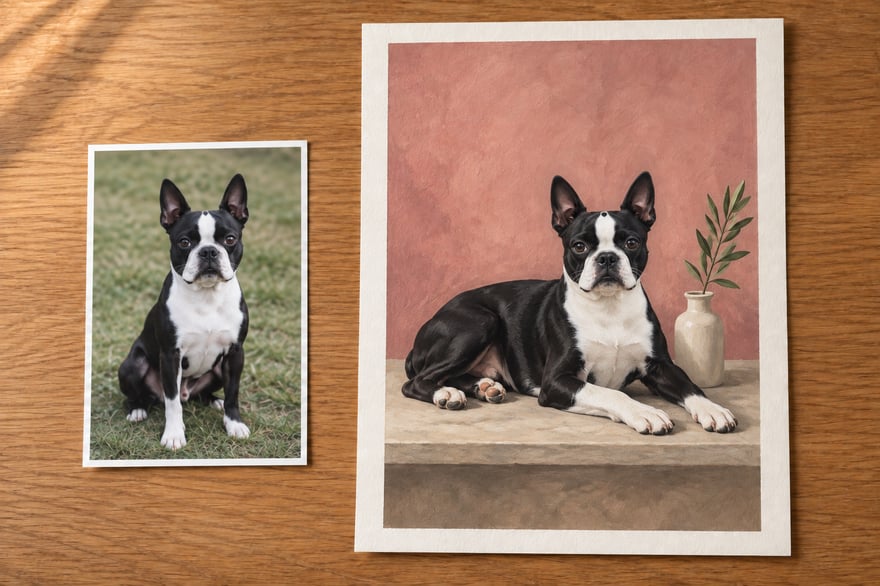
For example, a dog sitting on the lawn can become a reclining painted subject in a quiet studio scene. The setting and treatment change; the dog's recognizable features should still carry through. A painted coat can use broad strokes without needing every strand of fur to match the photo.
Ask yourself whether the concern is about the pet or the artistic direction. “The muzzle is too wide” identifies a likeness adjustment. “I would prefer a less dramatic scene” is a style preference. Both are worth discussing, but they call for different decisions. Our portrait style guide can help with the second.
How do you ask for a useful adjustment?
Write a short note with three parts: what you notice, what you want, and which reference shows it. There is no need to diagnose how the image was made.
Here are two fictional examples:
Please keep the soft background. His muzzle looks longer here than in the uploaded photo. Could you shorten it to match that photo while keeping his expression?
Her front paw on the right side of the picture should have a small white tip, rather than a long white sock. The second photo shows the edge of that marking clearly.
Use “on the right side of the picture” when that is clearer than “her left.” If you supply another image, explain its job: one may show coat color, while the original remains the reference for expression.
Group the important requests into one considered message. Include what already works so your feedback gives the artist a clear direction. After an adjustment, check the new version against the same photos and notes.
What if the reference is unclear?
A dark shadow can hide a marking; a filtered photograph can make coat color hard to judge. Try the original file or another unfiltered image before asking for a detail neither picture shows. Our photo selection guide explains what makes a useful reference.
If an older photograph is all you have, say so. Point out what you know and what you are unsure about. A conversation about the available detail is more useful than guessing at an invisible feature.
What should you confirm before approval?
Look at the latest complete artwork once more. Check that the pet, requested changes, and crop are right. If the design includes a name, read its spelling separately from the picture.
Confirm the size and finish in your order details too. An editorial room scene or a screen preview cannot tell you the physical dimensions of the piece you selected.
At Yours, Theo, the initial preview helps you choose a direction. For a printed portrait, an artist then reviews and refines the piece with you before your approval for printing. Our studio craft page explains that process.
Common questions
Do I need to know which artistic technique caused a problem?
No. Describe the visible difference and provide the clearest reference you have.
Should I approve while an important change is still unresolved?
Wait until you have reviewed the version you want printed. Use your order's review instructions to raise the remaining point.
Can I request a completely different theme?
Ask the studio before assuming a new direction is a small adjustment. A change of theme or source photo can alter the scope of the work.
Ready to start
The portrait should give you the pleasure of recognizing someone familiar. Start your portrait, choose a scene you love, and keep your favorite photo nearby when you review the result.